Network Ports and Protocols: How Data Flows and Where It Leaks
Misconfigured ports expose services to the internet, turning internal tools into entry points for attackers who scan for open doors.
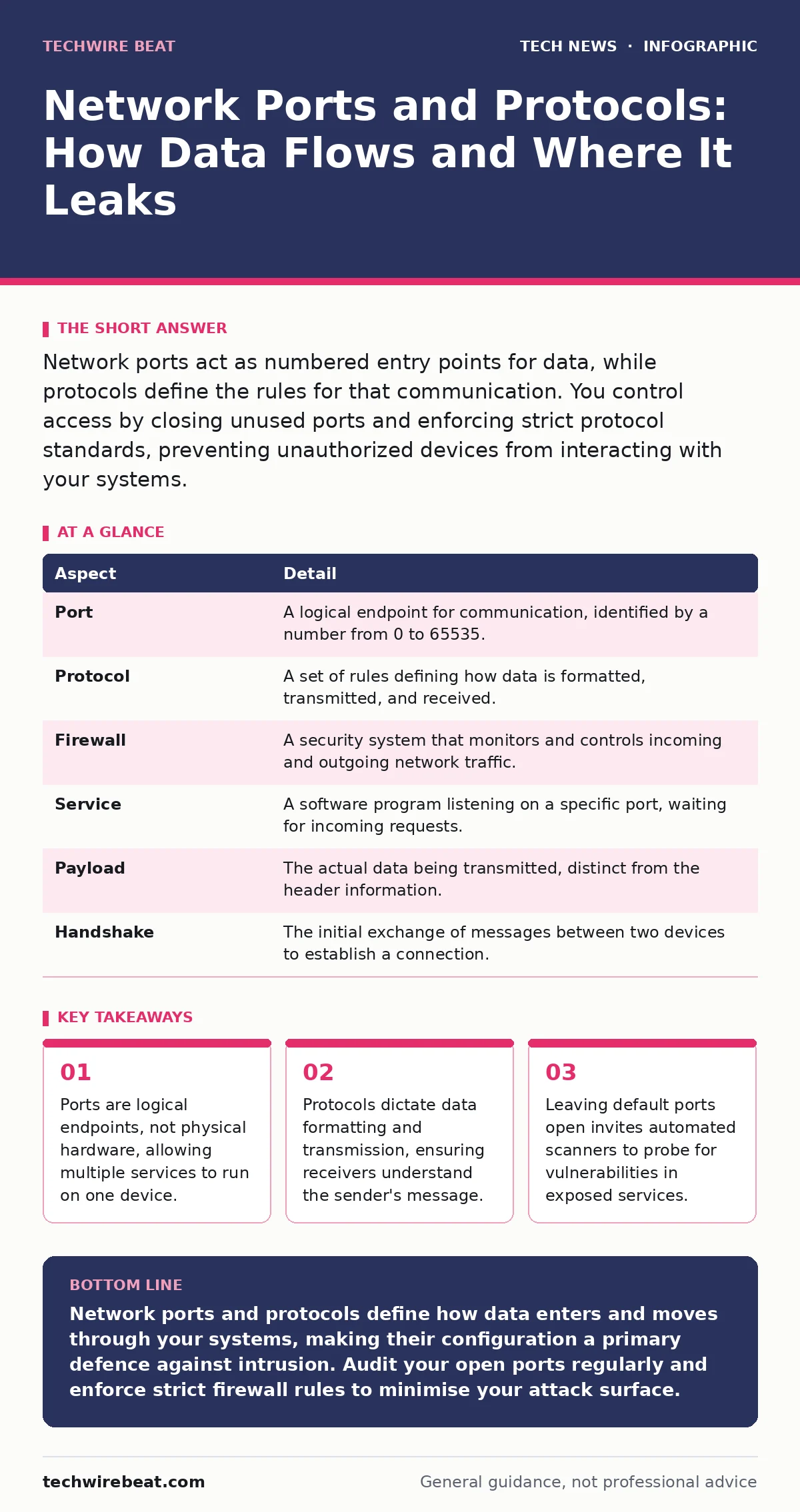
Network ports act as numbered entry points for data, while protocols define the rules for that communication. You control access by closing unused ports and enforcing strict protocol standards, preventing unauthorized devices from interacting with your systems.
Everyday Analogy for Network Communication
Imagine a large office building with hundreds of mailboxes. The building address represents the IP address, which tells the postal service where to deliver the item. The mailbox number represents the port, which tells the building manager which specific department should receive the letter. The type of envelope and the language inside represent the protocol, which dictates how the recipient should read and process the content. Without this structure, every letter would pile up in the lobby, and no department would know what to do with it.
This analogy highlights why network ports and protocols matter. The IP address gets the data to the correct machine, but the port directs it to the correct application. The protocol ensures the application can interpret the data correctly. If you send a financial report via a protocol designed for instant messaging, the system cannot process the numbers. This separation of concerns allows computers to handle thousands of simultaneous tasks without confusion.
At a Glance: Core Components
| Aspect | Detail |
|---|---|
| Port | A logical endpoint for communication, identified by a number from 0 to 65535. |
| Protocol | A set of rules defining how data is formatted, transmitted, and received. |
| Firewall | A security system that monitors and controls incoming and outgoing network traffic. |
| Service | A software program listening on a specific port, waiting for incoming requests. |
| Payload | The actual data being transmitted, distinct from the header information. |
| Handshake | The initial exchange of messages between two devices to establish a connection. |
Understanding Network Ports and Protocols
Network ports and protocols form the backbone of digital communication. A port is a virtual concept, a number assigned to a specific service running on a computer. When you visit a website, your browser connects to port 80 for HTTP or port 443 for HTTPS. The protocol, such as TCP or UDP, determines how the data travels. TCP ensures every piece of data arrives in order, while UDP sends data quickly without checking for errors. You must understand this distinction because security measures often target one layer while leaving the other exposed.
Protocols operate at different layers of the network stack. Application-layer protocols like SMTP handle email, while transport-layer protocols like TCP handle the delivery mechanism. Mixing these concepts leads to configuration errors. For instance, you might secure the application firewall but leave the transport layer open to brute-force attacks. The interaction between ports and protocols creates a complex web of dependencies. A change in one protocol version can break compatibility with legacy systems that expect older port behaviours.
Who It Affects and Why It Matters
Every device connected to a network is affected by port and protocol management. Home users benefit from secure ports when streaming video or browsing the web. Businesses rely on them for internal communication and external client access. Developers need to understand these mechanisms to build applications that communicate efficiently. Misconfiguration affects anyone who shares an IP address with vulnerable services. If one user on a shared network leaves a port open, attackers may pivot to other devices on the same segment.
The impact extends beyond immediate data loss. Downtime from port-based attacks disrupts operations. Imagine a hospital network where a misconfigured port allows unauthorised access to patient records. The breach compromises privacy, but the subsequent shutdown of services to investigate the incident halts critical care. This scenario illustrates how technical details have real-world consequences. Proper configuration protects not just data, but the continuity of service.
What to Do About It
You must audit your network regularly to identify open ports. Use network scanning tools to map which services are listening on which ports. Close any ports that do not serve a business purpose. This process, known as port hardening, reduces the attack surface. You should also enforce protocol standards. Disable outdated protocols like Telnet, which transmits data in plain text, and replace them with secure alternatives like SSH. This ensures that even if traffic is intercepted, the content remains unreadable.
Implement a default-deny firewall policy. This means all traffic is blocked unless explicitly permitted. You create rules to allow specific ports and protocols for authorised users. Regularly review these rules to remove access for employees who have left or changed roles. This administrative task prevents stale permissions from becoming security holes. You should also monitor for unusual traffic patterns. A sudden spike in traffic to a specific port may indicate an attack in progress.
See also: Stop Public Wi-Fi Risks: Real Protection vs Hype
What People Usually Get Wrong
Many users believe that hiding ports provides security. This is a misconception known as security through obscurity. Attackers use automated scanners that check every port on every IP address. Hiding a port does not stop these scans; it only delays detection. Once an attacker finds the hidden port, they often bypass standard defences because the administrator assumed the port was safe. You must secure the service itself, not just its location.
Another common error is assuming that encryption solves all problems. Encrypting traffic protects data in transit, but it does not prevent an attacker from accessing the service if the port is open. If you encrypt a login form but leave the server vulnerable to injection attacks, the encryption is irrelevant. You must apply security controls at every layer. Understanding the difference between securing the channel and securing the endpoint is vital for effective defence.
Integrating with Other Security Measures
Port security works best when combined with other controls. You should integrate it with your broader security strategy. For instance, understanding macOS security settings helps you manage local firewall rules that complement network-level protections. Similarly, configuring virtual machines requires careful port forwarding rules to prevent guests from accessing the host network improperly. These local measures add a layer of defence that network firewalls cannot provide.
You should also consider how website security principles apply to internal services. Treating internal portals with the same rigour as public websites ensures consistent security standards. Implementing IT asset management helps you keep track of which devices should have which ports open. This inventory allows you to detect rogue devices that appear on the network with unexpected open ports. Regular audits ensure that your port configuration matches your actual hardware and software landscape.
Advanced Considerations for Complex Networks
In larger environments, you may use bring your own device policies to manage external devices connecting to your network. These policies should restrict access to specific ports, preventing personal devices from accessing sensitive internal services. You should also evaluate OAuth implementations for services that require external authentication. Ensuring that OAuth endpoints are protected and that tokens are transmitted over secure protocols prevents credential theft.
For high-security requirements, consider Certificate Transparency logs to monitor for fraudulent certificates issued for your domain. This helps detect if an attacker is trying to intercept traffic via a man-in-the-middle attack. Additionally, enforcing one-time passwords adds a layer of authentication that protects against password reuse attacks. These measures, combined with strict port and protocol management, create a defence-in-depth strategy that is difficult for attackers to bypass.
Key takeaways
- Ports are logical endpoints, not physical hardware, allowing multiple services to run on one device.
- Protocols dictate data formatting and transmission, ensuring receivers understand the sender's message.
- Leaving default ports open invites automated scanners to probe for vulnerabilities in exposed services.
- Firewall rules should default to denying all traffic, permitting only specific, verified connections.
Network ports and protocols define how data enters and moves through your systems, making their configuration a primary defence against intrusion. Audit your open ports regularly and enforce strict firewall rules to minimise your attack surface.
Frequently asked questions
What is the difference between a port and a protocol?
A port is a numbered endpoint for a specific service, while a protocol is the set of rules governing how data is formatted and transmitted between systems.
How do I know which ports are open on my computer?
You can use network scanning tools or built-in command-line utilities to list active connections and listening services, identifying which ports are accessible to others.
Is it safe to open ports for remote access?
Opening ports for remote access increases risk. You should use secure protocols like SSH, enforce strong authentication, and restrict access to specific IP addresses to mitigate danger.
Can changing port numbers improve security?
Changing port numbers provides minimal security through obscurity. Attackers easily scan for open ports, so you must focus on securing the service itself and applying regular patches.
How this guide was produced: written by the TechWire Beat editorial team with AI assistance, checked against the public references listed below, and reviewed when the facts change. See our editorial policy or report an error.