AES Encryption vs TKIP: Why Your Network Security Is Failing
TKIP was a temporary patch for old hardware that leaves data vulnerable, while AES provides the mathematical strength required for modern threat models.
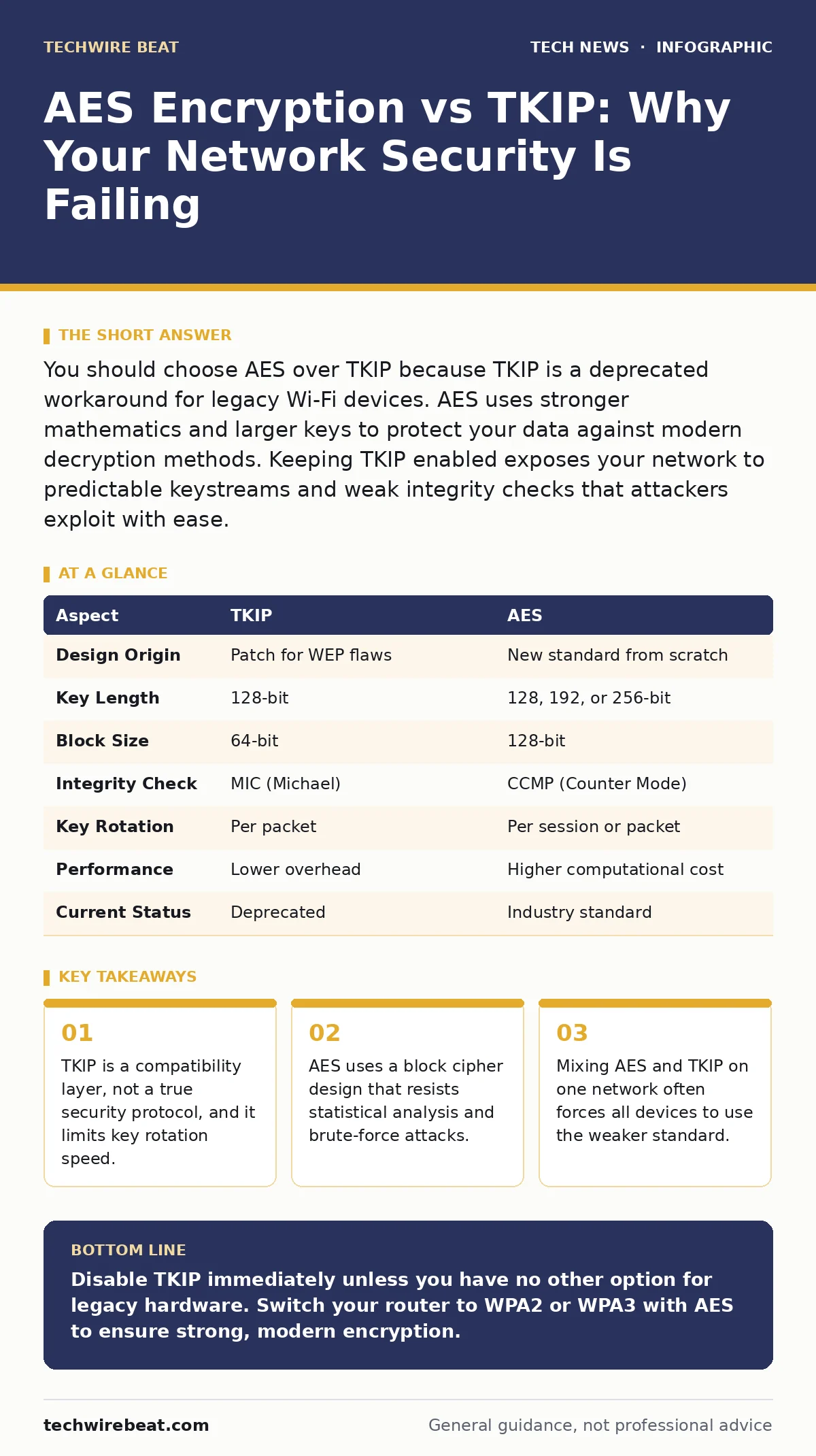
You should choose AES over TKIP because TKIP is a deprecated workaround for legacy Wi-Fi devices. AES uses stronger mathematics and larger keys to protect your data against modern decryption methods. Keeping TKIP enabled exposes your network to predictable keystreams and weak integrity checks that attackers exploit with ease.
The Core Difference Between AES and TKIP
The fundamental difference between AES encryption and TKIP lies in their design intent and mathematical strength. TKIP was created as a quick software update to fix broken security in older wireless standards without replacing hardware. It reuses parts of the older WEP protocol, merely adding extra steps to make attacks harder. AES is a completely new cipher designed from scratch to handle large amounts of data securely. It does not rely on the flawed foundations of its predecessor.
What Is TKIP Encryption?
TKIP stands for Temporal Key Integrity Protocol. It was introduced to address the critical flaws in WEP, which allowed attackers to decrypt traffic within minutes. TKIP does not change the underlying encryption algorithm. Instead, it adds a message integrity check and rotates the encryption key for every packet sent. This makes it harder for attackers to gather enough data to crack the key. However, this rotation is slow compared to modern standards. It also relies on a 64-bit initialization vector, which is too short for current threat models.
What Is AES Encryption?
AES stands for Advanced Encryption Standard. It is a symmetric block cipher that processes fixed-size blocks of data using complex mathematical operations. Unlike TKIP, AES was not built to patch an old system. It was selected through a global competition to replace outdated methods. AES supports key lengths of 128, 192, or 256 bits. Longer keys provide exponentially more difficulty for brute-force attacks. The algorithm mixes data thoroughly, making patterns invisible to statistical analysis. It is the foundation for end-to-end encryption in many applications.
| Aspect | TKIP | AES |
|---|---|---|
| Design Origin | Patch for WEP flaws | New standard from scratch |
| Key Length | 128-bit | 128, 192, or 256-bit |
| Block Size | 64-bit | 128-bit |
| Integrity Check | MIC (Michael) | CCMP (Counter Mode) |
| Key Rotation | Per packet | Per session or packet |
| Performance | Lower overhead | Higher computational cost |
| Current Status | Deprecated | Industry standard |
Detailed Point-by-Point Comparison
The security of a network depends on more than just the encryption name. TKIP uses a Michael message integrity check, which is vulnerable to forgery attacks. Attackers can manipulate packets without detection, redirecting traffic or injecting commands. AES uses Counter Mode with CBC-MAC, which provides both confidentiality and integrity. This combination prevents tampering and eavesdropping simultaneously. TKIP’s 64-bit block size creates vulnerabilities when large amounts of data are transmitted. Patterns emerge that skilled attackers can exploit. AES uses a 128-bit block size, eliminating this specific risk.
Performance is another differentiator. TKIP was designed for slow, early Wi-Fi chips. It adds overhead that slows down modern high-speed connections. AES is hardware-accelerated in modern processors and network cards. This means your computer handles AES encryption with minimal impact on speed. Using TKIP on a fast network creates a bottleneck. It limits your throughput to the capabilities of the weakest security layer. This is why smart home security devices often struggle when forced to use legacy protocols.
When To Choose AES
You should choose AES when you have full control over the devices connecting to your network. Modern smartphones, laptops, and tablets support WPA2 and WPA3, which mandate AES. This ensures that every packet of data is protected by strong mathematics. Choose AES when you transmit sensitive information such as financial details or private communications. The larger key sizes prevent decryption even if an attacker captures traffic for extended periods. It also future-proofs your setup against advances in computing power.
See also: Stop Public Wi-Fi Risks: Real Protection vs Hype
When To Choose TKIP
There is almost no valid reason to choose TKIP in a modern environment. It should only be considered if you have end-of-life hardware that cannot be updated or replaced. Even then, the security risk is significant. If you must use TKIP, isolate those devices on a separate guest network. This prevents a breach on the legacy device from affecting your primary systems. Consider upgrading the hardware instead. The cost of a new device is usually lower than the cost of a data breach. For context, see guides on IT asset management to track old devices.
Overlap and Transition Strategies
The overlap between these technologies exists only in transitional periods. Many routers allow both to coexist, but this is dangerous. It creates a weakest-link scenario. Attackers scan for networks offering TKIP and target them exclusively. To transition safely, audit all connected devices. Identify those that require TKIP. Replace them or isolate them. Gradually move all users to WPA2 or WPA3. This process requires patience but significantly improves security. Review website security practices to ensure your endpoints are also protected.
Final Considerations For Network Security
Security is a continuous process, not a one-time setting. Regularly update your router firmware to patch new vulnerabilities. Disable remote management features that expose your router to the internet. Use strong passphrases for your Wi-Fi network to prevent unauthorized access. Monitor your network for unknown devices. If you see traffic you do not recognize, investigate immediately. These steps complement the encryption choice. They create layers of defence that protect you even if one layer fails.
Key takeaways
- TKIP is a compatibility layer, not a true security protocol, and it limits key rotation speed.
- AES uses a block cipher design that resists statistical analysis and brute-force attacks.
- Mixing AES and TKIP on one network often forces all devices to use the weaker standard.
Disable TKIP immediately unless you have no other option for legacy hardware. Switch your router to WPA2 or WPA3 with AES to ensure strong, modern encryption.
Frequently asked questions
Can I use AES and TKIP together safely?
No, mixing them often forces the entire network to use the weaker TKIP standard, reducing security for all devices.
Is WPA2 the same as AES?
WPA2 is a security protocol that uses AES encryption. WPA3 is the newer version that also uses AES but with stronger authentication.
Does AES slow down my internet?
Modern hardware accelerates AES, so it has negligible impact on speed. TKIP causes more slowdowns due to its inefficient design.
How do I know if my router uses AES?
Look for WPA2-Personal or WPA3-Personal in your settings. Avoid WPA-Personal or WPA/WPA2 Mixed Mode.
How this guide was produced: written by the TechWire Beat editorial team with AI assistance, checked against the public references listed below, and reviewed when the facts change. See our editorial policy or report an error.