Account Lockout Policy Mistakes: How to Avoid Security Pitfalls
Misconfigured account lockout policies often create more vulnerability than they prevent, exposing systems to denial-of-service attacks and user frustration without stopping determined attackers.
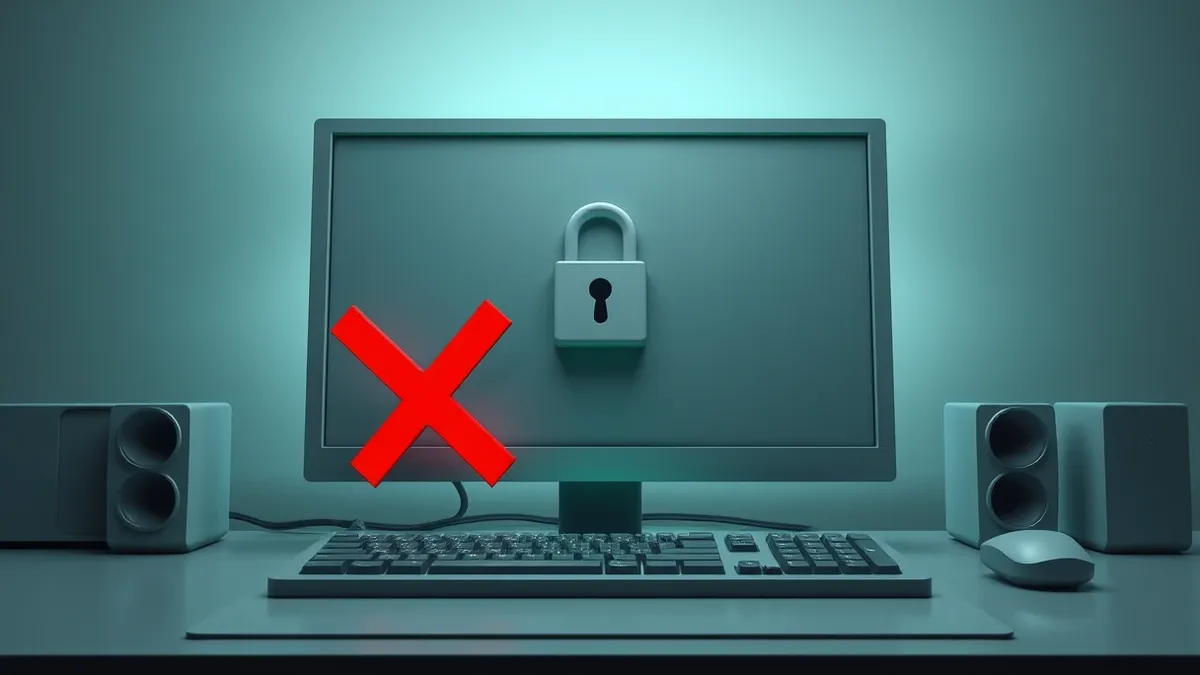
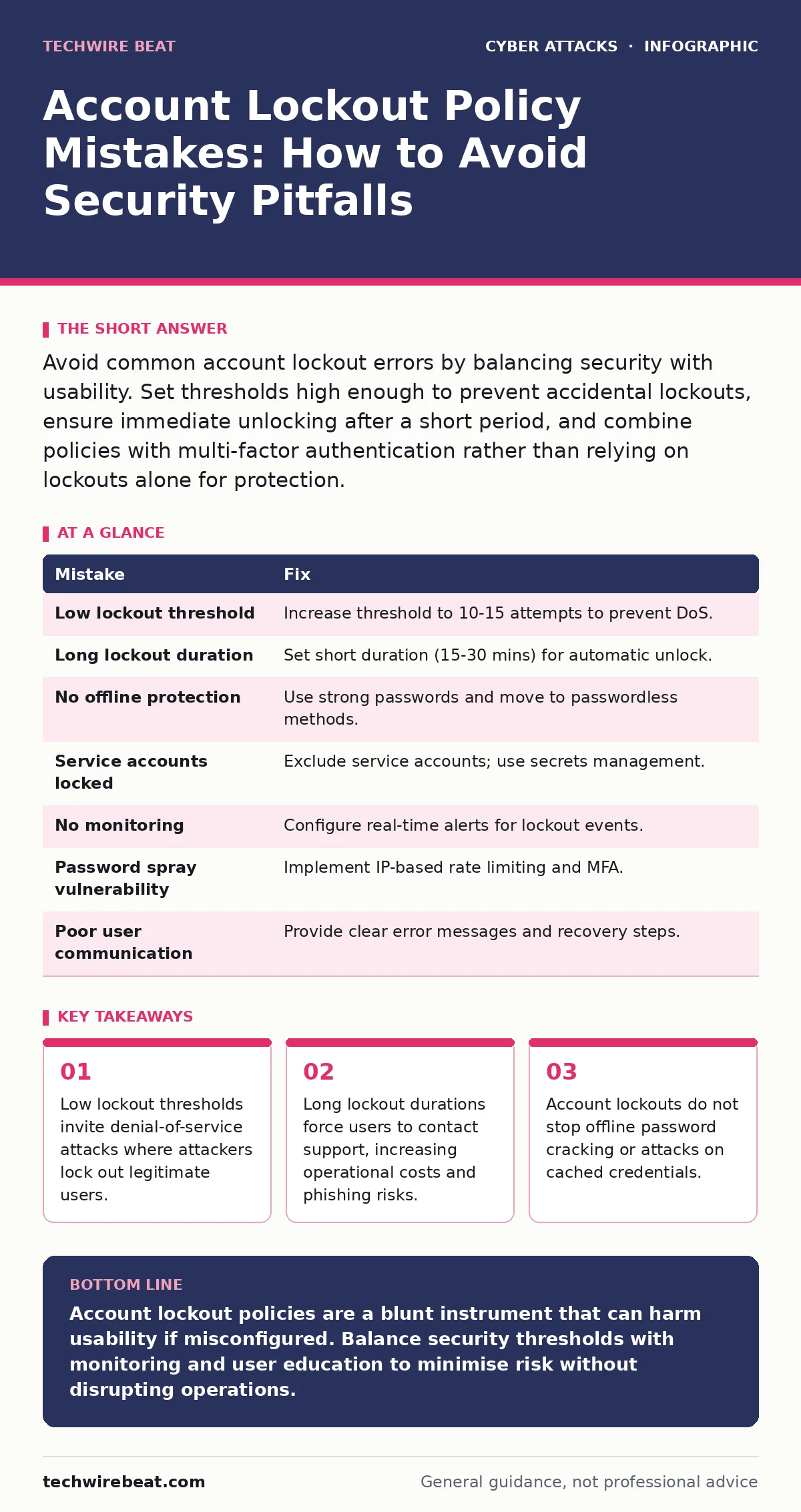
Avoid common account lockout errors by balancing security with usability. Set thresholds high enough to prevent accidental lockouts, ensure immediate unlocking after a short period, and combine policies with multi-factor authentication rather than relying on lockouts alone for protection.
Mistake 1: Setting the Lockout Threshold Too Low
Many administrators configure account lockout policies to trigger after three or four failed login attempts. This setting assumes that a legitimate user will rarely mistype their password. In reality, users frequently make typos, especially on mobile devices or when using complex passwords.
Why it hurts:
A low threshold makes your system vulnerable to a denial-of-service attack. An attacker can systematically attempt logins for every user in your directory. After just a few failed guesses, the legitimate account is locked. The attacker has not gained access, but they have denied service to the real user. This is a form of harassment that disrupts business operations and floods your helpdesk with unlock requests.
The fix:
Increase the lockout threshold to a number that balances security with usability, such as ten or fifteen failed attempts. This allows for reasonable human error while still detecting automated brute-force scripts. You must pair this with monitoring so that a spike in failed attempts triggers an alert, even if the account is not yet locked.
Mistake 2: Ignoring the Lockout Duration
Some policies lock an account indefinitely until an administrator manually unlocks it. Others set a duration so long that users remain locked out for hours. This creates a bottleneck in your security operations.
Why it hurts:
Indefinite or long-duration lockouts shift the burden of security to your support staff. Users who are locked out become frustrated and may seek workarounds, such as writing down passwords or asking colleagues for their credentials. This behaviour undermines other security controls. Furthermore, if an attacker locks out an account, they know the account is disabled, which can be useful intelligence for planning further attacks.
The fix:
Set a short lockout duration, such as fifteen or thirty minutes. This allows the account to unlock automatically once the attack subsides or the user resolves the typing issue. It reduces the administrative overhead of manual unlocking. Ensure that this duration is long enough to disrupt automated tools but short enough to minimise user inconvenience.
Mistake 3: Relying on Lockouts for Offline Attacks
Account lockout policies apply to online authentication protocols. They do not protect against offline attacks. If an attacker steals a password hash from your directory database, they can attempt to crack it on their own hardware.
Why it hurts:
Since the cracking attempt happens offline, your server does not see the failed attempts. The lockout policy never triggers. The attacker can try billions of password combinations without any restriction from your system. This renders the lockout policy completely ineffective against data breaches where credential hashes are exfiltrated.
The fix:
Implement strong password complexity requirements and encourage the use of long passphrases. More importantly, move towards passwordless authentication methods. See our guide on hardware security keys for a method that eliminates the need for passwords in many scenarios. This removes the value of stolen hashes entirely.
Mistake 4: Not Excluding Service Accounts
Service accounts are non-interactive accounts used by applications and systems to access resources. Some administrators apply the same account lockout policy to these accounts as they do to human users.
Why it hurts:
If an application encounters a temporary network glitch or a misconfigured credential, it may retry the login several times. This can trigger the lockout policy. The service account becomes locked, causing the application to fail. This can lead to widespread system outages that are difficult to diagnose. The user experience degrades because the application appears broken, not because of a security event.
The fix:
Exclude service accounts from account lockout policies where possible. Instead, ensure that service account passwords are rotated regularly and stored securely in a secrets manager. Monitor these accounts for unusual activity separately. This prevents automated failures from locking out critical infrastructure.
Mistake 5: Failing to Monitor and Alert
Setting a policy is not enough. You must actively monitor the events that trigger these policies. Many organisations set the threshold and duration but do not configure alerts for lockout events.
Why it hurts:
Without alerts, you may not realise you are under attack until a user reports a locked account. By then, the attacker may have moved on to other targets. You miss the opportunity to identify the source of the attack and block it at the network level. This delay allows the attacker to gather intelligence and plan further intrusions.
The fix:
Configure real-time alerts for account lockout events. Integrate these alerts with your security information and event management system. This allows your security team to investigate the source of the failed attempts immediately. You can then block the attacking IP address or investigate compromised credentials.
See also: Browser in the Browser Attacks: How Fake Logins Steal Credentials · Browser-in-the-Browser Attacks: 6 Myths That Keep You Vulnerable
Mistake 6: Overlooking Password Spray Attacks
A password spray attack involves trying one common password against many different usernames. This differs from brute-force attacks, which try many passwords against one username. This method is designed to stay below the account lockout threshold.
Why it hurts:
If your lockout threshold is ten attempts, an attacker can try the password "Password123" against ten different users. Each user has only one failed attempt, so no account is locked. The attacker continues to spray this password across your entire directory. Eventually, they may find a user who uses that weak password. The lockout policy fails to detect this distributed attack pattern.
The fix:
Implement rate limiting on the authentication server. This restricts the number of login attempts from a single IP address or within a short time window, regardless of the username. Combine this with multi-factor authentication, which adds a second layer of security that is not vulnerable to password spraying. Our guide on multi-factor authentication explains how to implement this effectively.
Mistake 7: Neglecting User Communication
Users are often unaware of why their accounts are locked. When a lockout occurs, they receive a generic error message that provides no context or next steps.
Why it hurts:
Confused users are more likely to click on phishing emails that claim to help them reset their password. Attackers exploit this confusion by sending emails that mimic your helpdesk, offering to unlock the account. If users do not trust the official process, they may fall for these scams. This undermines your overall security posture and makes users vulnerable to social engineering.
The fix:
Provide clear, helpful error messages when an account is locked. Explain that the account was locked due to multiple failed attempts and that it will unlock automatically after a set period. Instruct users on how to contact support if they suspect their account has been compromised. Incorporate this into your security awareness training to ensure users understand the policy.
Summary of Fixes
| Mistake | Fix |
|---|---|
| Low lockout threshold | Increase threshold to 10-15 attempts to prevent DoS. |
| Long lockout duration | Set short duration (15-30 mins) for automatic unlock. |
| No offline protection | Use strong passwords and move to passwordless methods. |
| Service accounts locked | Exclude service accounts; use secrets management. |
| No monitoring | Configure real-time alerts for lockout events. |
| Password spray vulnerability | Implement IP-based rate limiting and MFA. |
| Poor user communication | Provide clear error messages and recovery steps. |
Key takeaways
- Low lockout thresholds invite denial-of-service attacks where attackers lock out legitimate users.
- Long lockout durations force users to contact support, increasing operational costs and phishing risks.
- Account lockouts do not stop offline password cracking or attacks on cached credentials.
Account lockout policies are a blunt instrument that can harm usability if misconfigured. Balance security thresholds with monitoring and user education to minimise risk without disrupting operations.
Frequently asked questions
Should I disable account lockout policies for remote users?
No, but you should adjust the thresholds. Remote users may have unstable connections that cause failed logins. Increase the threshold and ensure rate limiting is in place to prevent abuse.
How do I distinguish between a brute-force attack and a user forgetting their password?
Look for the pattern. Brute-force attacks usually come from a single IP with many usernames or one username with many attempts in a short time. Forgotten passwords are sporadic and often from the user’s usual location.
Can account lockouts stop ransomware attacks?
No. Ransomware often spreads through lateral movement using already compromised credentials or unpatched vulnerabilities. Lockouts do not prevent the initial compromise or the spread of malware.
What is the best alternative to account lockout policies?
Multi-factor authentication is the most effective alternative. It ensures that even if a password is compromised, the attacker cannot access the account without the second factor. See our guide on zero trust security for a broader approach.
How this guide was produced: written by the TechWire Beat editorial team with AI assistance, checked against the public references listed below, and reviewed when the facts change. See our editorial policy or report an error.