Video Conferencing Security: Benefits, Limits and When to Use It
Encryption protects data in transit but cannot verify the identity of the person behind the screen or the integrity of their local device.
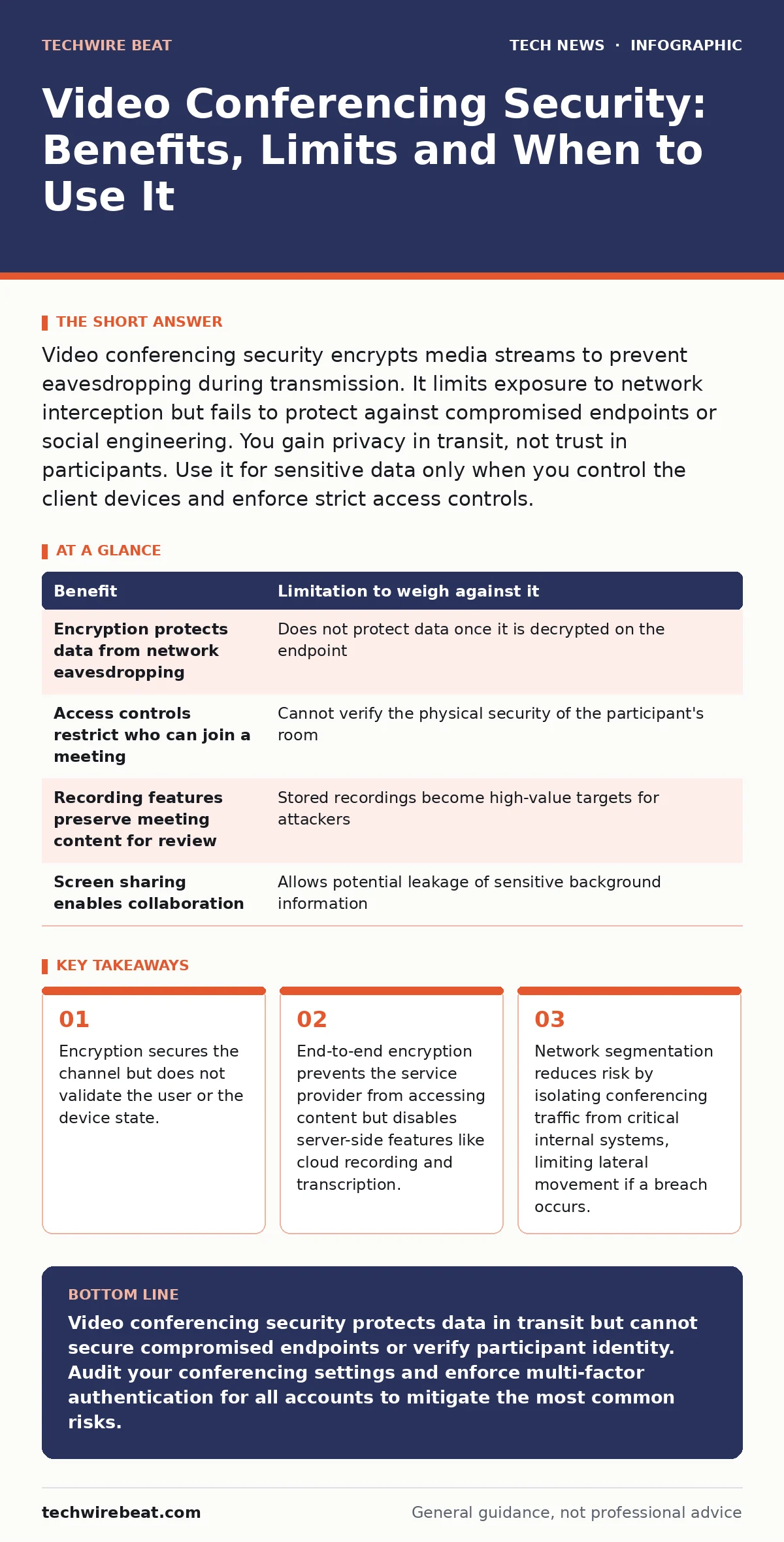
Video conferencing security encrypts media streams to prevent eavesdropping during transmission. It limits exposure to network interception but fails to protect against compromised endpoints or social engineering. You gain privacy in transit, not trust in participants. Use it for sensitive data only when you control the client devices and enforce strict access controls.
The Core Mechanism of Transport Security
Video conferencing platforms rely on encryption to protect data as it travels across public networks. The primary mechanism is Transport Layer Security, which creates an encrypted tunnel between your device and the service provider’s servers. This prevents intermediate parties, such as internet service providers or café owners, from reading the audio or video streams. The encryption keys are negotiated dynamically for each session, ensuring that even if an attacker captures the traffic, they cannot decrypt it without the specific session keys. This protects the confidentiality of your conversation while it is in motion.
This protection applies only to data in transit. Once the data reaches the server, or once it is stored on a device, different security controls apply. Many users assume that because the video call is encrypted, the entire interaction is secure. This is a misconception. Encryption ensures that no one can listen in on the wire, but it does not guarantee that the person on the other end is who they claim to be. It also does not prevent malware on your own computer from recording the screen before encryption occurs.
Identity Verification and Trust Boundaries
The greatest vulnerability in video conferencing is not the network, but the identity of the participants. Authentication confirms that a user is who they say they are, but it rarely verifies the integrity of the device they are using. Imagine a scenario where an attacker uses a stolen account to join a meeting. The platform authenticates the login credentials successfully, but it cannot detect that the device is compromised. The attacker can share their screen, record the session, or inject malicious links into the chat.
This limitation means that security controls must extend beyond the conferencing platform itself. You must enforce multi-factor authentication for all accounts to reduce the risk of credential theft. Even with strong passwords, a compromised device can bypass many layers of defence. The platform trusts the client application to behave correctly. If the client is infected with spyware, the encryption layer becomes irrelevant because the data is captured at the source.
| Benefit | Limitation to weigh against it |
|---|---|
| Encryption protects data from network eavesdropping | Does not protect data once it is decrypted on the endpoint |
| Access controls restrict who can join a meeting | Cannot verify the physical security of the participant's room |
| Recording features preserve meeting content for review | Stored recordings become high-value targets for attackers |
| Screen sharing enables collaboration | Allows potential leakage of sensitive background information |
Endpoint Risks and Local Compromise
Your computer is the weakest link in the security chain. Video conferencing software requires access to your microphone, camera, screen and sometimes your file system. These permissions are necessary for functionality but create significant attack surfaces. Malware can exploit vulnerabilities in the conferencing client to gain deeper access to your operating system. Once inside, attackers can bypass application-level controls and capture data before it is encrypted or after it is decrypted.
This is why keeping software updated is a primary defence. Vulnerabilities in conferencing clients are frequently discovered and patched. Running outdated software leaves you exposed to known exploits. Additionally, the physical environment matters. A secure network connection cannot protect you if someone is standing behind you, reading your screen or listening to your conversation. The security boundary of a video call ends at your device.
End-to-End Encryption Trade-offs
Some platforms offer end-to-end encryption, where encryption keys are held only by the participants and never by the service provider. This provides a higher level of privacy because the provider cannot access the content of your meetings, even if compelled by law enforcement or compromised by hackers. However, this comes with significant functional limitations. End-to-end encryption often disables features that require server-side processing, such as cloud recording, live transcription and automated meeting summaries.
You must choose between maximum privacy and maximum functionality. If your organisation requires recorded meetings for compliance or training, end-to-end encryption may not be suitable. The trade-off is that you lose the convenience of cloud-based features in exchange for stronger confidentiality guarantees. Understanding this trade-off helps you decide which mode to use for different types of meetings. Sensitive strategic discussions may warrant end-to-end encryption, while routine team updates may not.
Network Architecture and Segmentation
How you connect to video conferencing services affects your overall security posture. Using a corporate network for all traffic exposes internal resources to potential threats originating from the conferencing platform or its users. Network segmentation separates conferencing traffic from critical internal systems. This limits the damage if a user’s device is compromised. An attacker who gains access to the network through a video call cannot easily move laterally to access sensitive databases or internal applications.
This approach requires careful configuration but significantly reduces risk. It ensures that even if a user joins a malicious meeting or clicks a phishing link shared during a call, the impact is contained. Network monitoring tools can help detect unusual traffic patterns that may indicate a breach. Proper segmentation is a foundational element of a secure remote work environment.
See also: Breach Notification Laws: Six Common Misreadings Explained · End-to-End Encryption Explained: How Your Data Stays Private
When It Is Worth It
Implementing rigorous video conferencing security is worth the effort when handling sensitive information. Financial data, personal health information and strategic business plans require strong protection. The cost of a breach can far exceed the effort required to configure secure settings. Organisations that rely on remote collaboration for critical operations must invest in secure conferencing practices. The benefits of secure communication outweigh the limitations when the stakes are high.
It is also worth it when regulatory compliance is mandatory. Many industries have strict requirements for data protection and privacy. Using secure conferencing tools helps meet these obligations. The effort to configure encryption, enforce access controls and train users is justified by the need to avoid legal penalties and reputational damage. For these scenarios, the limitations of the technology are manageable through additional controls.
When It Is Not
Strict video conferencing security measures are not always necessary for low-risk interactions. Casual team check-ins, public webinars and non-sensitive training sessions do not require the highest levels of protection. Over-securing these interactions can reduce usability and frustrate users. The effort to enforce strict controls may not provide a meaningful return on investment. In these cases, standard security practices are sufficient.
It is also not worth implementing complex security architectures for short-term, ad-hoc meetings. The time required to configure secure environments may outweigh the benefits. For occasional use, relying on the default security settings of reputable platforms is often adequate. Understanding when to apply rigorous controls and when to simplify helps balance security with productivity. Not every conversation needs the same level of protection.
Key takeaways
- Encryption secures the channel but does not validate the user or the device state.
- End-to-end encryption prevents the service provider from accessing content but disables server-side features like cloud recording and transcription.
- Network segmentation reduces risk by isolating conferencing traffic from critical internal systems, limiting lateral movement if a breach occurs.
Video conferencing security protects data in transit but cannot secure compromised endpoints or verify participant identity. Audit your conferencing settings and enforce multi-factor authentication for all accounts to mitigate the most common risks.
Frequently asked questions
Does end-to-end encryption make video calls completely secure?
No, end-to-end encryption protects data from the service provider but does not prevent malware on your device from capturing the screen or audio before encryption.
How can I verify that my video call is encrypted?
Check the connection status in your client application or browser for a secure indicator, such as a padlock icon, and ensure the platform uses modern encryption standards.
Is it safe to share my screen during a video call?
Screen sharing exposes everything on your display, including notifications and background applications. Use window sharing instead of full-screen sharing to limit exposure.
What is the biggest risk in video conferencing?
The biggest risk is usually social engineering or compromised user devices, rather than technical breaches of the encryption protocol itself.
How this guide was produced: written by the TechWire Beat editorial team with AI assistance, checked against the public references listed below, and reviewed when the facts change. See our editorial policy or report an error.