Delta 2.0 optimizes retro gaming on iPhone Duo with pose-specific controls and Liquid Glass UI
The retro gaming app Delta has launched version 2.0, introducing optimised controls for the iPhone Duo and a refreshed Liquid Glass design language.

Key points
- Delta 2.0 introduces specific controller skins for the iPhone Duo's various folding poses.
- The update adds Sega Genesis ROM compatibility and improved library navigation features.
- Audio settings now allow game sound to mix with other media like podcasts or music.
The popular retro game emulator Delta has released version 2.0, bringing significant interface updates and dedicated support for the iPhone Duo hardware. According to 9to5Mac, this major update focuses on adapting the gaming experience to the new device's unique form factor and display capabilities.
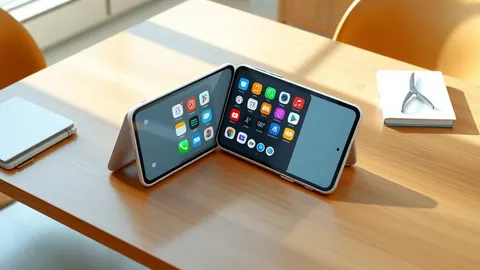
The app now includes specially designed controller skins that work across different iPhone Duo poses. These layouts utilise the full inner display size and span the crease when the device is partially folded in portrait book mode.
What we know
Delta developers have ensured the application naturally reflows onto the portrait closed outer screen of the iPhone Duo. A notable feature allows users to fold the device closed to automatically put the emulated system to sleep, mimicking physical console behaviour.
When using landscape split view, Delta exposes the bottom half of the virtual console as a custom keyboard view. This allows the control interface to stretch across the full screen width, overlapping adjacent apps in the split view layout.
Beyond hardware support, the update includes Sega Genesis ROM compatibility and improved library navigation. Audio settings have been updated to allow game audio to mix alongside currently playing music or podcasts on the device.
Defender's checklist
- Verify that emulator applications are downloaded only from official app stores.
- Check that game files used with emulators are from legitimate personal backups.
- Review app permissions to ensure access is limited to necessary media libraries.
- Keep the operating system updated to support new app interface features securely.
The background in plain language
Emulators are software programmes that allow one device to mimic the hardware of another, enabling users to run older games on modern systems. This requires the software to translate instructions from the original console into a format the current processor understands. Users must typically provide their own game files, known as ROMs, which are digital copies of physical cartridges or discs. Legal usage generally requires owning the original physical copy of the game being emulated.
What to do and how to stay safe: Delta emulator
- Ensure you own the original physical copies of any games you intend to emulate.
- Download emulator software only from verified official sources like the App Store.
- Keep your device operating system updated to maintain compatibility with new app versions.
- Review privacy settings to control what data the emulator can access on your device.
General security guidance from the TechWire Beat newsroom. It is not confirmed advice from the organisations named in this story.
Frequently asked questions
Does Delta 2.0 support the iPhone Duo?
Yes, the update includes dedicated support for the iPhone Duo with optimised controller skins for various folding poses.
Can you play Sega Genesis games on Delta 2.0?
Yes, the new version adds compatibility for Sega Genesis ROMs alongside other existing features.
How does the audio setting work in the new update?
The updated audio settings allow game audio to mix alongside other media, such as music or podcasts, playing on the device.